部分ビューとビューコンポネント
部分ビューを使うと、HTMLの部分は分割できて綺麗に記述できるのですが、
そこに流し込むデータは、相変わらずコントローラーで取得することになり、ロジックの分割はできていないです。
そこでデータの取得も分割するために、View Componentを使います。
部分ビューは、親Viewからデータを受け取るのに対し、
View Componentは、直接データを取得するといった違いがあります。
部分ビューを使った場合
例として、以下のようなシンプルなブログがあったとします。
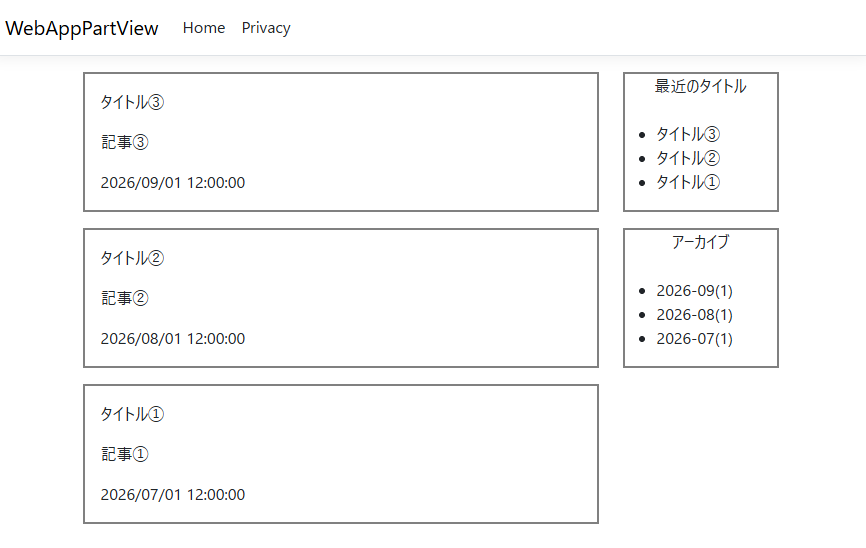
記事と、最近のタイトル、アーカイブを部分ビューを使って書いてみます。
プロジェクトは、ASP.NET Core Webアプリ(MVC)でWebAppPartViewとして作ってあります。
まずは、記事の部分
./Models/Post.cs
namespace WebAppPartView.Models
{
    public class Post
    {
        public string title { get; set; }
        public string content { get; set; }
        public DateTime createTime { get; set; }
    }
}
データ取得は、適当に取得できるよう関数を用意しておきます。
./Models/Data.cs
namespace WebAppPartView.Models
{
    public class Data
    {
        public static List<Post>GetPostList()
        {
            var posts = new List<Post>();
            posts.Add(new Post { title = "タイトル③", content = "記事③", createTime = DateTime.Parse("2026-09-01 12:00") });
            posts.Add(new Post { title = "タイトル②", content = "記事②", createTime = DateTime.Parse("2026-08-01 12:00") });
            posts.Add(new Post { title = "タイトル①", content = "記事①", createTime = DateTime.Parse("2026-07-01 12:00") });
            return posts;
        }

        public static List<string> GetLatestTitleList()
        {
            return new List<string> { "タイトル③", "タイトル②", "タイトル①" };
        }

        public static List<string> GetArchiveData()
        {
            return new List<string> { "2026-09(1)", "2026-08(1)", "2026-07(1)" };
        }
    }
}
記事を3件取得と、最新のタイトルを3件取得と、アーカイブを取得する関数の3つです。
ブログ記事、最新の記事タイトル、アーカイブをコントローラーで取得して、Viewに渡すための型を追加します。
./Models/BlogIndex.cs
namespace WebAppPartView.Models
{
    public class BlogIndex
    {
        public List<Post> PostList { get; set; }
        public List<string> LatestTitleList { get; set; }
        public List<string> ArchiveData { get; set; }
    }
}
ひな形でつくられる HomeController.csのIndexメソッドを書き換えます。
./Controllers/HomeControllers.cs
        public IActionResult Index()
        {
            var blogIndexData = new BlogIndex();
            blogIndexData.PostList = Data.GetPostList();
            blogIndexData.LatestTitleList = Data.GetLatestTitleList();
            blogIndexData.ArchiveData = Data.GetArchiveData();

            return View("Index", blogIndexData);
        }
あとは、Indexのビューを書き換えていきます。
./Views/Home/Index.cshtml
@model BlogIndex;

@{
    ViewData["Title"] = "Home Page";
}

<div class="row">
    <div class="col-9">
        @await Html.PartialAsync("_postList", Model.PostList)
    </div>

    <div class="col-3">
        @await Html.PartialAsync("_latestTitleList", Model.LatestTitleList)
        @await Html.PartialAsync("_archiveData", Model.ArchiveData)
    </div>
</div>
部分ビューをつかっているのでシンプルですね。
部分ビューは、コントローラーで取得したデータを部分ビューとデータを指定して渡しています。
各部分ビューはこんな感じ
記事部分
./Views/Shared/_postList.cshtml
@model IEnumerable<Post>

@foreach(var post in Model)
{
    <div class="mb-3 p-3" style="border:2px solid gray;">
        <div class="title">@post.title</div>
        <div class="content mt-3 mb-3">@post.content</div>
        <div class="text-right">@post.createTime</div>
    </div>
}
最新の記事タイトル
./Views/Shared/_latestTitleList.cshtml
@model IEnumerable<string>

<div class="mb-3" style="border:2px solid gray;">
    <div class="text-center">最近のタイトル</div><br />
    <ul>
        @foreach (var title in Model)
        {
            <li>@(title)</li>
        }
    </ul>
</div>
アーカイブ
./Views/Shared/_archiveData.cshtml
@model IEnumerable<string>

<div class="mb-3" style="border:2px solid gray;">
    <div class="text-center">アーカイブ</div><br />
    <ul>
        @foreach (var archive in Model)
        {
            <li>@(archive)</li>
        }
    </ul>
</div>
ビューコンポーネント
今回データの取得の部分が、単純化されているため、そこまで複雑に感じませんが、
ブログの記事の処理と、サイドバーの処理が入っていてあまりきれいじゃないです。
ここを分離するのが、View Componentになります。
つまりロジックを分離し、View側からロジックを読んであげる形になります。
今度は、プロジェクトを ASP.NET Core Webアプリ(MVC)でWebAppViewComponentとして作ってあります。
まずは、記事の部分。クラスの内容は同じ
./Models/Post.cs
namespace WebAppViewComponent.Models
{
    public class Post
    {
        public string title { get; set; }
        public string content { get; set; }
        public DateTime createTime { get; set; }
    }
}
データの取得も一緒
./Models/Data.cs
namespace WebAppViewComponent.Models
{
    public class Data
    {
        public static List<Post> GetPostList()
        {
            var posts = new List<Post>();
            posts.Add(new Post { title = "タイトル③", content = "記事③", createTime = DateTime.Parse("2026-09-01 12:00") });
            posts.Add(new Post { title = "タイトル②", content = "記事②", createTime = DateTime.Parse("2026-08-01 12:00") });
            posts.Add(new Post { title = "タイトル①", content = "記事①", createTime = DateTime.Parse("2026-07-01 12:00") });
            return posts;
        }

        public static List<string> GetLatestTitleList()
        {
            return new List<string> { "タイトル③", "タイトル②", "タイトル①" };
        }

        public static List<string> GetArchiveData()
        {
            return new List<string> { "2026-09(1)", "2026-08(1)", "2026-07(1)" };
        }
    }
}
部分ビューを使った例では、コントローラーでデータを取得して渡していましたが、
View Componentでは、それぞれで値をとりに行くので、コントローラーから除外できます
その結果、Indexメソッドはシンプルになっています。
./Controllers/HomeControllers.cs
        public IActionResult Index()
        {
            return View();
        }
すっきりします。
./Views/Home/Index.cshtml
@{
    ViewData["Title"] = "Home Page";
}

<div class="row">
    <div class="col-9">
        @await Component.InvokeAsync("PostList")
    </div>

    <div class="col-3">
        @await Component.InvokeAsync("LatestTitleList")
        @await Component.InvokeAsync("ArchiveData")
    </div>
</div>
View Componentの仕組みは、Viewと処理をするViewComponentのクラスにて構成されています。
このあと、PostListViewComponent.cs, LatestTitleListViewComponent.cs, ArchiveDataViewComponent.cs を作っていきます。
ViewComponentより前の文字列を指定します。
Controllerのクラスは、 HomeならHomeControllerとなるように、
ViewComponentのクラスは、名前 + ViewComponentとします。
保存場所は特に規定はないのです。慣例で ./ViewComponent に格納するらしいです。
./ViewComponents/PostListViewComponent.cs
using Microsoft.AspNetCore.Mvc;
using WebAppViewComponent.Models;

namespace WebAppViewComponent.ViewComponents
{
    public class PostListViewComponent : ViewComponent
    {
        public async Task<IViewComponentResult> InvokeAsync()
        {
            var data = Data.GetPostList();
            return View(data);
        }
    }
}
ViewComponentのクラスは、ViewComponentを継承します。
InvokeAsync() にデータを取得するロジックを書きます。
Controller同様に、コンストラクタで Context を取り出し、
Contextをつかってデータを取り出すこともできます。
※InvokeAsyncなら、 Task
このViewComponentに該当するViewは、以下階層に配置する必要があります。
./Views/Shared/Components/PostList/Default.cshtml
Controllerの場合、View名を省略すると、{Controller名}.cshtmlになるが
Componentの場合は、View名を指定しないと Default.cshtmlになる。
./Views/Shared/Components/PostList/Default.cshtml
@model IEnumerable<Post>

@foreach (var post in Model)
{
    <div class="mb-3 p-3" style="border:2px solid gray;">
        <div class="title">@post.title</div>
        <div class="content mt-3 mb-3">@post.content</div>
        <div class="text-right">@post.createTime</div>
    </div>
}
他のViewComponentも用意する。
./ViewComponents/LatestTitleListViewComponent.cs
using Microsoft.AspNetCore.Mvc;
using WebAppViewComponent.Models;

namespace WebAppViewComponent.ViewComponents
{
    public class LatestTitleListViewComponent : ViewComponent
    {
        public async Task<IViewComponentResult> InvokeAsync()
        {
            var data = Data.GetLatestTitleList();
            return View(data);
        }
    }
}
./Views/Shared/Components/LatestTitleList/Default.cshtml
@model IEnumerable<string>

<div class="mb-3" style="border:2px solid gray;">
    <div class="text-center">最近のタイトル</div><br />
    <ul>
        @foreach (var title in Model)
        {
            <li>@(title)</li>
        }
    </ul>
</div>
./ViewComponents/ArchiveDataViewComponent.cs
using Microsoft.AspNetCore.Mvc;
using WebAppViewComponent.Models;

namespace WebAppViewComponent.ViewComponents
{
    public class ArchiveDataViewComponent : ViewComponent
    {
        public async Task<IViewComponentResult> InvokeAsync()
        {
            var data = Data.GetArchiveData();
            return View(data);
        }
    }
}
./Views/Shared/Components/LatestTitleList/Default.cshtml
@model IEnumerable<string>

<div class="mb-3" style="border:2px solid gray;">
    <div class="text-center">アーカイブ</div><br />
    <ul>
        @foreach (var archive in Model)
        {
            <li>@(archive)</li>
        }
    </ul>
</div>
Default.cshtmlをつかうのではなく、別の名前をつかうのであれば、
ViewComponentクラスからViewで呼ぶときに、名前を指定する必要あり。
共通の部品の場合は、
./Views/Shared/Components/{Component名}/{View名}.cshtml でよいが
特定のControllerしか使わない場合は、
./Views/{Controller名}/Components/{Component名}/{View名}.cshtml でもよい
View components in ASP.NET Core
https://learn.microsoft.com/en-us/aspnet/core/mvc/views/view-components